一、安装 1. 下载源码 1 2 3 4 wget http://fast.dpdk.org/rel/dpdk-21.02.tar.xz tar xJf dpdk-21.02.tar.xz cd v21.02
DPDK源文件由几个目录组成:
lib: DPDK 库文件
drivers: DPDK 轮询驱动源文件
app: DPDK 应用程序 (自动测试)源文件
examples: DPDK 应用例程
config, buildtools, mk: 框架相关的makefile、脚本及配置文件
2. 编译 1 2 3 4 5 6 7 8 9 10 11 12 13 pip3 install meson ninja meson build cd buildninja ninja install ldconfig
二、配置 1. 预留大页 1 2 3 4 5 6 7 8 9 10 11 12 13 14 15 16 17 18 19 20 21 echo 1024 > /sys/kernel/mm/hugepages/hugepages-2048kB/nr_hugepagesecho 10240 > /sys/devices/system/node/node0/hugepages/hugepages-2048kB/nr_hugepagesecho 10240 > /sys/devices/system/node/node1/hugepages/hugepages-2048kB/nr_hugepagesmkdir /mnt/hugemount -t hugetlbfs pagesize=1GB /mnt/huge grep -i HugePages_Total /proc/meminfo mount | grep hugetlbfs cat /proc/meminfo | grep Huge
2. 加载 UIO 驱动 1 2 3 4 5 6 7 8 9 10 11 modprobe uio_pci_generic ./usertools/dpdk-devbind.py --status ./usertools/dpdk-devbind.py --bind =uio_pci_generic <device name or <bus>:<device>.<function > ./usertools/dpdk-devbind.py --bind =mlx5_core <device name or <bus>:<device>.<function >
三、运行 Demo DPDK 在 examples 文件下预置了一系列示例代码,这里以 Helloworld 为例进行编译:
1 2 3 4 cd buildmeson configure -Dexamples=all ninja cd example
编译完成后会在 build 目录下生成一个可执行文件,通过附加一些 EAL 参数可以运行起来
1 2 3 4 5 6 build/helloworld -l 0-3 -n 2
以下参数都是比较常用的
c COREMASK: 要运行的内核的十六进制掩码。注意,平台之间编号可能不同,需要事先确定。l x-y: 指定处理器核心运行,一般与 c 不共用。n NUM: 每个处理器插槽的内存通道数目。b <domain:bus:devid.func>: 端口黑名单,避免EAL使用指定的PCI设备。a: 仅使用指定的以太网设备。使用[domain:]bus:devid.func 值,不能与 b 选项一起使用,可以多次出现来使用多个设备。
-socket-mem: 从特定插槽上的hugepage分配内存。m MB: 内存从hugepage分配,不管处理器插槽。建议使用 -socket-mem 而非这个选项。r NUM: 内存数量。v: 显示启动时的版本信息。-huge-dir: 挂载hugetlbfs的目录。-file-prefix: 用于hugepage文件名的前缀文本。-proc-type: 程序实例的类型。-xen-dom0: 支持在Xen Domain0上运行,但不具有hugetlbfs的程序。-vmware-tsc-map: 使用VMware TSC 映射而不是本地RDTSC。-base-virtaddr: 指定基本虚拟地址。-vfio-intr: 指定要由VFIO使用的中断类型。(如果不支持VFIO,则配置无效)。
四、核心组件 DPDK 整套架构是基于以下四个核心组件设计而成的
1. 环形缓冲区管理(librte_ring) 一个无锁的多生产者,多消费者的FIFO表处理接口,可用于不同核之间或是逻辑核上处理单元之间的通信。
2. 内存池管理(librte_mempool) 主要职责是在内存中分配用来存储对象的 pool。 每个 pool以名称来唯一标识,并且使用一个ring来存储空闲的对象节点。 它还提供了一些其他的服务,如针对每个处理器核心的缓存或者一个能通过添加 padding 来使对象均匀分散在所有内存通道的对齐辅助工具。
3. 网络报文缓冲区管理(librte_mbuf) 它提供了创建、释放报文缓存的能力,DPDK 应用程序可能使用这些报文缓存来存储数据包。,这个缓存通常在程序开始时通过 DPDK 的 mempool 库创建。 这个库提供了创建和释放 mbuf 的 API,能用来暂存数据包。
4. 定时器管理(librte_timer) 这个模块为 DPDK 的执行单元提供了异步执行函数的能力,也能够周期性的触发函数。它是通过环境抽象层 EAL 提供的能力来获取的精准时间。
五、环境抽象层(EAL) EAL 是用于为 DPDK 程序提供底层驱动能力抽象的,它使 DPDK 程序不需要关注下层具体的网卡或者操作系统,而只需要利用 EAL 提供的抽象接口即可,EAL 会负责将其转换为对应的 API。
EAL 主要提供了以下能力的抽象接口:
DPDK的加载和启动:DPDK和指定的程序链接成一个独立的进程,并以某种方式加载
CPU亲和性和分配处理:DPDK提供机制将执行单元绑定到特定的核上,就像创建一个执行程序一样。
系统内存分配:EAL实现了不同区域内存的分配,例如为设备接口提供了物理内存。
PCI地址抽象:EAL提供了对PCI地址空间的访问接口
跟踪调试功能:日志信息,堆栈打印、异常挂起等等。
公用功能:提供了标准libc不提供的自旋锁、原子计数器等。
CPU特征辨识:用于决定CPU运行时的一些特殊功能,决定当前CPU支持的特性,以便编译对应的二进制文件。
中断处理:提供接口用于向中断注册/解注册回掉函数。
告警功能:提供接口用于设置/取消指定时间环境下运行的毁掉函数。
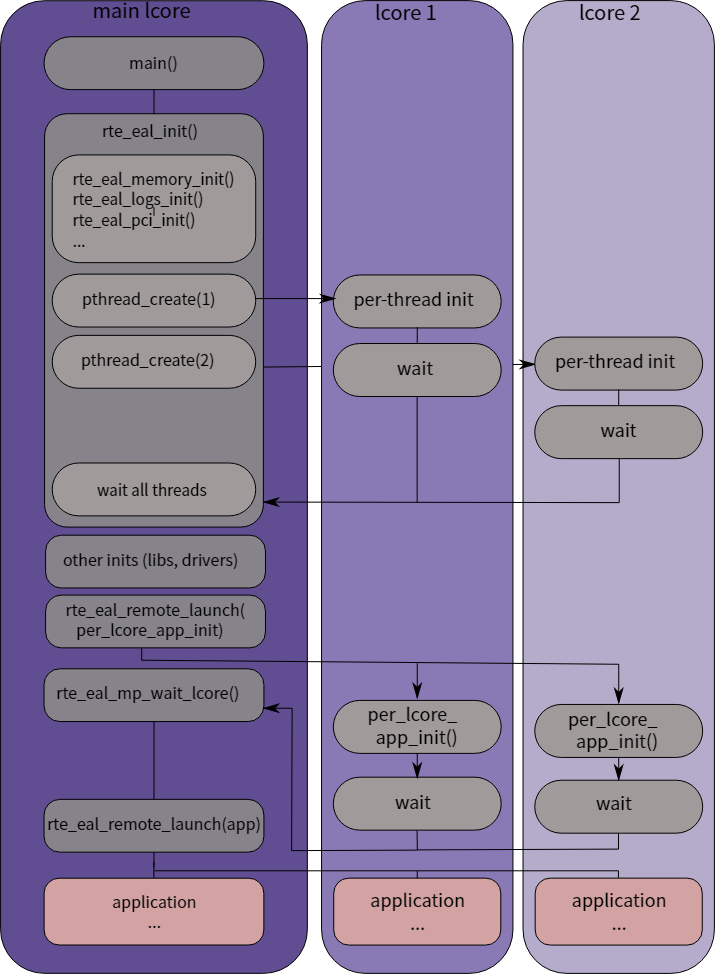
在 Linux 中,DPDK 程序是以 pthread 创建的用户态程序形式存在的,会有一个初始线程来负责 EAL 的初始化,EAL 会使用 mmap 来操作 hugetlbfs,具体流程如下图所示。
六、通用流rte_flow rte_flow 提供了一种通用的方式来配置硬件以匹配特定的 Ingress 或 Egress 流量,根据用户的任何配置规则对其进行操作或查询相关计数器。
这种通用的方式细化后就是一系列的流规则,每条流规则由多种匹配模式和动作列表组成。
一个流规则可以具有几个不同的动作(如在将数据重定向到特定队列之前执行计数,封装,解封装等操作), 而不是依靠几个规则来实现这些动作,应用程序操作具体的硬件实现细节来顺序执行。
1 2 3 4 5 6 7 8 #define MAX_PATTERN_NUM 3 #define MAX_ACTION_NUM 2 struct rte_flow { struct rte_flow_attr attr ; struct rte_flow_item pattern [MAX_PATTERN_NUM ]; struct rte_flow_action action [MAX_ACTION_NUM ]; }
1. 属性rte_flow_attr a. 组group 流规则可以通过为其分配一个公共的组号来分组,通过jump的流量将执行这一组的操作。较低的值具有较高的优先级。组0具有最高优先级,且只有组0的规则会被默认匹配到。
b. 优先级priority 可以将优先级分配给流规则。像Group一样,较低的值表示较高的优先级,0为最大值。
组和优先级是任意的,取决于应用程序,它们不需要是连续的,也不需要从0开始,但是最大数量因设备而异,并且可能受到现有流规则的影响。
c. 流量方向ingress or egress 流量规则可以应用于入站和/或出站流量(Ingress/Egress)。
2. 模式条目rte_flow_item 模式条目类似于一套正则匹配规则,用来匹配目标数据包,其结构如代码所示。
1 2 3 4 5 6 struct rte_flow_item { enum rte_flow_item_type type ; const void *spec; const void *last; const void *mask; };
首先模式条目rte_flow_item_type可以分成两类:
用于根据协议类型来匹配(如 ANY、ETH、VLAN、IPv4、UDP、TCP 等)
用于根据数据或影响模式来匹配(如 END、VOID、INVERT、PORT 等)
同时每个条目可以最多设置三个相同类型的结构:
spec:精准匹配的数值last:与spec 组成一个范围mask:应用于spec和last的位掩码
a. ANY 可以匹配任何协议,还可以一个条目匹配多层协议。
1 2 3 4 item.type = RTE_FLOW_ITEM_TYPE_ANY struct rte_flow_item_any any = {.num = 2 }item.spec = &any item.last = &any
b. ETH 1 2 3 4 5 6 item.type = RTE_FLOW_ITEM_TYPE_ETH struct rte_flow_item_eth eth = { .dst= dst_mac, .src= src_mac } item.spec = ð
c. IPv4 1 2 3 4 5 6 7 8 item.type = RTE_FLOW_ITEM_TYPE_IPV4 struct rte_flow_item_ipv4 ip = { .hdr = { .dst_addr = htonl(dest_ip), .src_addr = htonl(src_ip) } } item.spec = &ip
d. TCP 1 2 3 4 5 6 7 8 9 10 11 12 13 14 15 16 item.type = RTE_FLOW_ITEM_TYPE_TCP struct rte_tcp_hdr { rte_be16_t src_port; rte_be16_t dst_port; rte_be32_t sent_seq; rte_be32_t recv_ack; uint8_t data_off; uint8_t tcp_flags; rte_be16_t rx_win; rte_be16_t cksum; rte_be16_t tcp_urp; } tcp_hdr struct rte_flow_item_tcp tcp = .hdr = tcp_hdr } item.spec = &tcp
3. 操作rte_flow_action 操作用于对已经匹配到的数据包进行处理,同时多个操作也可以进行组合以实现一个流水线处理。
1 2 3 4 struct rte_flow_action { enum rte_flow_action_type type ; const void *conf; };
首先操作类别可以分成三类:
修改匹配流量去向的操作,例如删除或分配一个特定的目的地。
修改匹配流量内容或其属性的操作,包括添加/删除封装、加密、压缩和标记。
与流规则本身相关的操作,例如更新计数器或使其不终止(PASSTHRU进行复制)。
a. MARK 对流量进行标记,会设置PKT_RX_FDIR和PKT_RX_FDIR_ID两个 FLAG,具体的值可以通过hash.fdir.hi获得。
1 2 3 4 5 6 7 8 9 10 11 12 13 struct rte_flow_action_mark normal_mark =0xbef };struct rte_flow_action action = .type = RTE_FLOW_ACTION_TYPE_MARK, .conf = &normal_mark, }; if (ol_flags & PKT_RX_FDIR) { printf (" - FDIR matched " ); if (ol_flags & PKT_RX_FDIR_ID) printf ("ID=0x%x" , m->hash.fdir.hi); }
b. QUEUE 将流量上送到某个队列中
1 2 3 4 5 6 7 8 9 10 11 12 13 14 15 16 17 18 struct rte_flow_action_queue queue =1 };struct rte_flow_action action = .type = RTE_FLOW_ACTION_TYPE_QUEUE, .conf = &normal_mark, }; for (i = 0 ; i < nr_queues; i++) { nb_rx = rte_eth_rx_burst(port_id, i, mbufs, 32 ); if (nb_rx) { for (j = 0 ; j < nb_rx; j++) { struct rte_mbuf *m = rte_pktmbuf_free(m); } } }
c. DROP 将数据包丢弃
1 RTE_FLOW_ACTION_TYPE_DROP
d. COUNT 对数据包进行计数,如果同一个flow里有多个count操作,则每个都需要指定一个独立的 id,shared标记的计数器可以用于统一端口的不同的flow一同进行计数。
1 2 3 4 5 6 7 8 9 10 11 12 13 14 struct rte_flow_action_count shared_counter = .shared = 1 , .id = 100 , }; struct rte_flow_action_count dedicated_counter = .shared = 0 , }; struct rte_flow_action action = .type = RTE_FLOW_ACTION_TYPE_COUNT, .conf = &shared_counter, };
e. RAW_DECAP 用来对匹配到的数据包进行拆包,一般用于隧道流量的剥离。在action定义的时候需要传入一个data用来指定匹配规则和需要移除的内容。
1 2 3 4 5 6 7 8 9 10 11 12 13 14 15 16 17 18 19 20 21 22 23 24 25 26 27 28 29 30 31 32 33 struct rte_ether_hdr eth = .ether_type = RTE_BE16(RTE_ETHER_TYPE_IPV4), .d_addr.addr_bytes = "\x01\x02\x03\x04\x05\x06" , .s_addr.addr_bytes = "\x06\x05\x04\x03\x02\01" }; struct rte_flow_item_ipv4 ipv4 = .hdr = { .next_proto_id = IPPROTO_UDP }}; struct rte_flow_item_udp udp = .hdr = { .dst_port = rte_cpu_to_be_16(2152 ) }}; struct rte_flow_item_gtp gtp ;size_t decap_size = sizeof (eth) + sizeof (ipv4) + sizeof (udp) + sizeof (gtp); uint8_t decap_buf[decap_size];uint8_t *bptr;bptr = decap_buf; memcpy (bptr, ð, sizeof (eth));bptr += sizeof (eth); memcpy (bptr, &ipv4, sizeof (ipv4));bptr += sizeof (ipv4); memcpy (bptr, &udp, sizeof (udp));bptr += sizeof (udp); memcpy (bptr, >p, sizeof (gtp));bptr += sizeof (gtp); struct rte_flow_action_raw_decap decap = .size = decap_size , .data = decap_buf };
对流量进行负载均衡的操作,他将根据提供的数据包进行哈希操作,并将其移动到对应的队列中。
1 2 3 4 5 6 7 8 9 struct rte_flow_action_rss { enum rte_eth_hash_function func ; uint32_t level; uint64_t types; uint32_t key_len; uint32_t queue_num; const uint8_t *key; const uint16_t *queue ; }
其中的level属性用来指定使用第几层协议进行哈希:
0:默认操作,其代表自动判断使用哪一层进行操作
1:代表使用最外层
2-*:代表使用指定封装层进行
g. 拆包Decap
h. One\Two Port Hairpin
七、常用 API 1. 程序初始化 1 2 3 4 5 6 7 8 9 10 11 12 13 14 15 16 17 18 19 20 21 22 23 24 25 26 27 28 29 30 31 32 33 34 35 36 37 38 39 40 41 nb_ports = rte_eth_dev_count_avail(); if (nb_ports < 2 || (nb_ports & 1 )) rte_exit(EXIT_FAILURE, "Error: number of ports must be even\n" ); mbuf_pool = rte_pktmbuf_pool_create("mbuf_pool" , 40960 , 128 , 0 , RTE_MBUF_DEFAULT_BUF_SIZE, rte_socket_id()); if (mbuf_pool == NULL ) rte_exit(EXIT_FAILURE, "Cannot init mbuf pool\n" ); static int lcore_hello (__rte_unused void *arg) { unsigned lcore_id; lcore_id = rte_lcore_id(); printf ("hello from core %u\n" , lcore_id); return 0 ; } rte_eal_remote_launch(lcore_hello, NULL , lcore_id);
2. 端口初始化 1 2 3 4 5 6 7 8 9 10 11 12 13 14 15 16 17 18 19 20 21 22 23 24 25 26 27 28 29 30 31 32 33 34 35 36 37 38 39 40 41 42 struct rte_eth_conf port_conf = .rxmode = { .split_hdr_size = 0 , }, .txmode = { .offloads = DEV_TX_OFFLOAD_VLAN_INSERT | DEV_TX_OFFLOAD_IPV4_CKSUM | DEV_TX_OFFLOAD_UDP_CKSUM | DEV_TX_OFFLOAD_TCP_CKSUM | DEV_TX_OFFLOAD_SCTP_CKSUM | DEV_TX_OFFLOAD_TCP_TSO, }, }; struct rte_eth_txconf txq_conf ;struct rte_eth_rxconf rxq_conf ;struct rte_eth_dev_info dev_info ;ret = rte_eth_dev_info_get(port_id, &dev_info); if (ret != 0 ) rte_exit(EXIT_FAILURE, "Error during getting device (port %u) info: %s\n" , port_id, strerror(-ret)); port_conf.txmode.offloads &= dev_info.tx_offload_capa; printf (":: initializing port: %d\n" , port_id);ret = rte_eth_dev_configure(port_id, nr_queues, nr_queues, &port_conf); if (ret < 0 ) { rte_exit(EXIT_FAILURE, ":: cannot configure device: err=%d, port=%u\n" , ret, port_id); } rxq_conf = dev_info.default_rxconf; rxq_conf.offloads = port_conf.rxmode.offloads; txq_conf = dev_info.default_txconf; txq_conf.offloads = port_conf.txmode.offloads;
3. 队列初始化 1 2 3 4 5 6 7 8 9 10 11 12 13 14 15 16 17 18 19 20 21 22 for (i = 0 ; i < nr_std_queues; i++) { ret = rte_eth_rx_queue_setup(port_id, i, 512 , rte_eth_dev_socket_id(port_id), &rxq_conf, mbuf_pool); if (ret < 0 ) { rte_exit(EXIT_FAILURE, ":: Rx queue setup failed: err=%d, port=%u\n" , ret, port_id); } } for (i = 0 ; i < nr_std_queues; i++) { ret = rte_eth_tx_queue_setup(port_id, i, 512 , rte_eth_dev_socket_id(port_id), &txq_conf); if (ret < 0 ) { rte_exit(EXIT_FAILURE, ":: Tx queue setup failed: err=%d, port=%u\n" , ret, port_id); } }
[!tip] 💡





%20%E6%9C%8D%E5%8A%A1.jpeg)